

Is That Online Bill-Payment Site Official? Verify It Before You Pay a Debt
Before paying a debt through a search result, verify the official channel, fees, delivery timing, and final credit to the account.
Answer first: do not assume the first search result is your creditor's official payment page. Start with a recent statement, type the payment address printed there, confirm the exact domain and payment terms, review any fee or recurring authorization, save the receipt, and verify that the creditor actually credited the payment. A polished page, familiar company name, or padlock icon is not proof that a third-party service is affiliated with the biller.

A careful pause before entering payment details can protect both the due date and the money assigned to your payoff plan.
Why this question matters now
On August 17, 2026, the Federal Trade Commission announced a proposed settlement with online bill-payment company Doxo and two co-founders. The FTC said its case alleged that misleading search ads and landing pages made the service appear affiliated with billers, while fees and subscription terms were not adequately disclosed. The proposed order includes $2.1 million for consumer redress and restrictions on misrepresenting affiliations, costs, and recurring-payment terms.
Those are allegations and proposed settlement terms in one case—not proof that every third-party bill-payment service is unsafe. The FTC also notes that a stipulated final order has force of law only after a federal judge approves and signs it. The useful household lesson is narrower: before sending a debt payment through a page reached from search, verify who will receive your money, what the service costs, and when the creditor will get it.
That timing can matter. In the FTC's original 2024 action, the agency alleged that some payments reached billers days or weeks after consumers believed they had paid. For a utility, car loan, medical bill, or credit card, a gap between “money left my account” and “the biller credited my account” can disrupt a carefully built payoff plan.
The safest starting point is the bill, not a search result
Use the payment web address, phone number, or mailing instructions printed on a recent statement or shown inside an account you already know is legitimate. If you must search, treat the result as a lead—not as verification.
The FTC's consumer guidance, “Pay your bills, not impersonators”, warns that search results may not take you to the biller's official site. A paid result can appear above the company's organic result, and a third-party page can repeat a biller's name or logo without being the biller's payment channel.
Before entering an account number or bank information, compare:
- the domain with the address printed on the statement;
- the company name in the page footer and terms;
- the payment recipient shown at checkout;
- the amount the biller says is due;
- the promised delivery or crediting date;
- every service, delivery, convenience, or subscription charge; and
- whether a box authorizes recurring withdrawals.
HTTPS and a padlock icon mean the connection is encrypted. They do not establish that the company is your lender, utility, hospital, or authorized payment processor.
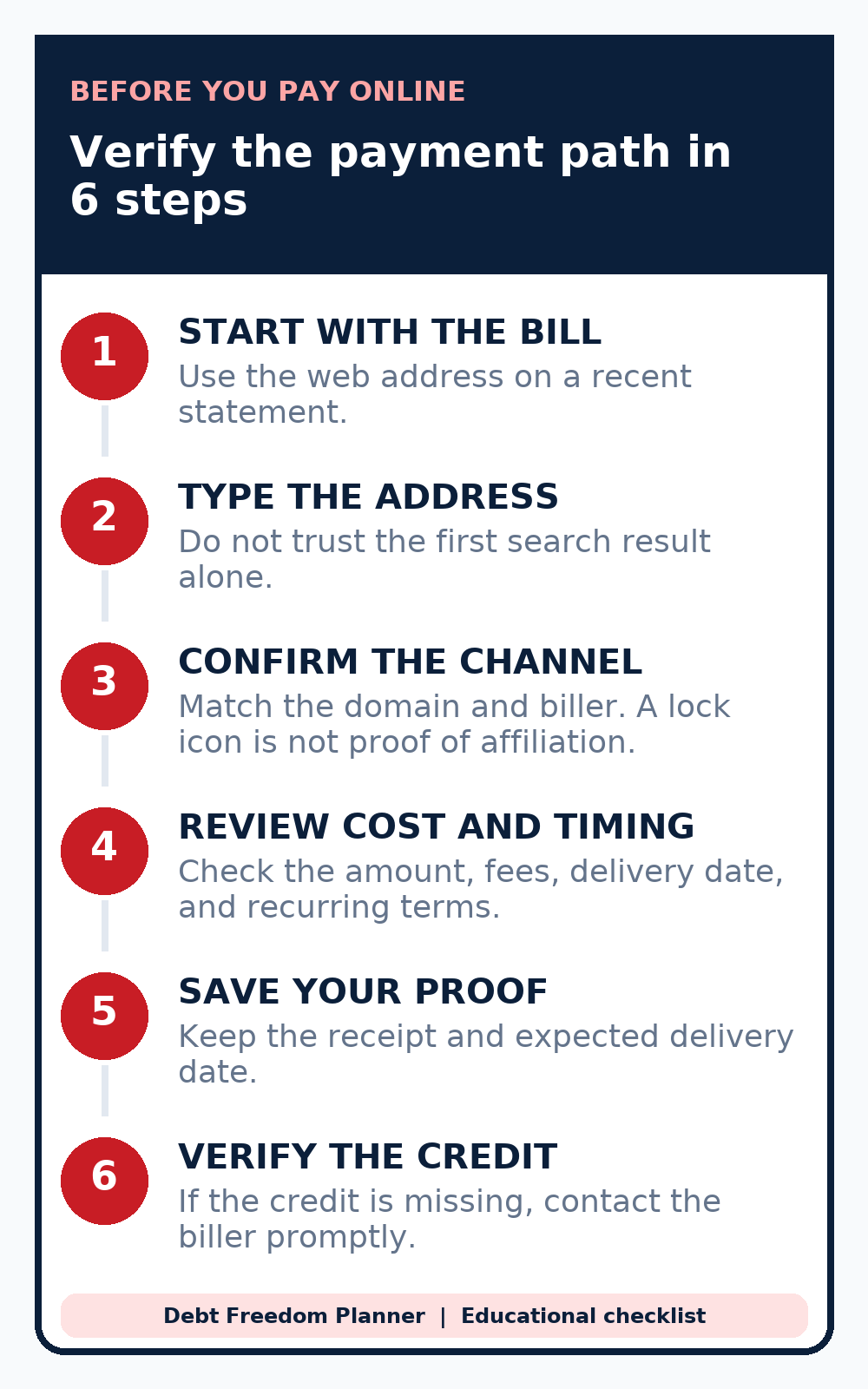
Start with the statement, confirm the payment channel, review cost and timing, save proof, and then verify the credit on the biller's account.
Direct payment, bank bill-pay, and automatic debit are different
These methods can look similar from your checking account, but the instructions travel through different systems.
| Method | Who receives your instruction? | What to verify |
|---|---|---|
| Creditor's website or app | The creditor or its disclosed processor | Domain, cutoff time, confirmation, and posting status |
| Bank or credit-union bill-pay | Your bank sends the payment | Correct payee, account number, send date, and delivery estimate |
| Automatic debit | The company pulls an authorized amount | Company legitimacy, amount or range, frequency, and cancellation terms |
| Independent payment service | A separate service transmits the payment | Affiliation, fees, delivery method, delivery date, and support path |
The CFPB explains the difference between automatic debit and bank bill-pay: with automatic debit, the company takes money from your account; with bank bill-pay, you instruct your bank or credit union to send it. The CFPB recommends verifying a company before sharing bank information, reviewing the authorization, and monitoring the amount and timing of transfers.
For credit cards, the current Regulation Z payment-crediting rule and official interpretation add a practical timing distinction. A payment made through the creditor's website is generally received when the consumer authorizes it, subject to permitted cutoff rules. A payment sent through a third-party payer is received when the creditor gets the check or electronic transfer. That is a reason to leave extra time when a third party sits between you and the creditor.
A six-step payment check
1. Start from a source you already trust
Use a current paper or electronic statement, a bookmarked account page you previously verified, or the number on the back of the card. Avoid logging in through an unexpected email or text link.
2. Confirm the exact destination
Read the full domain, not just the large company name on the page. If the biller's statement names an approved processor, the name should match. When in doubt, call the biller using the statement number and ask whether the payment site is authorized.
3. Read the final payment screen before submitting
Compare the bill amount with the final total. Look for a fee, faster-delivery option, trial, membership, or recurring-payment authorization. Do not assume an unchecked-looking box is harmless; read the nearby words and the final amount.
4. Check when the biller will receive the payment
“Submitted,” “processed,” and “received by the creditor” can be different events. If the due date is close, use a method the creditor identifies as conforming and check its cutoff time. Do not rely on an unverified third party's confirmation alone.
5. Save the evidence
Keep the confirmation number, receipt, amount, date, and payment method. A screenshot can help, but retain the email or downloadable receipt when available. Do not store full account numbers in an unsecured note.
6. Confirm the account was credited
Check the creditor's account after the stated processing period. If the payment is missing, contact the creditor and payment provider promptly. If you believe a company impersonated a biller or misrepresented the transaction, you can report the experience to the FTC.
Worked example: small payment fees can slow the plan
Suppose a household has three debts totaling $18,300 and uses the avalanche strategy:
| Debt | Starting balance | APR | Minimum payment |
|---|---|---|---|
| Credit card | $4,500 | 24.99% | $150 |
| Car loan | $12,000 | 8.25% | $275 |
| Medical payment plan | $1,800 | 0% | $75 |
The household can devote $600 per month to debt: $500 in minimums plus $100 extra. Now assume—purely for illustration—that paying the three bills through third-party channels adds a $6 fee to each monthly payment. That is $18 per month in hypothetical fees, leaving only $82 as the extra debt payment.
Debt Freedom Planner's payoff engine produces this comparison from a September 2026 start, with no new debt and all payments made as modeled:
| Hypothetical scenario | Total monthly debt payment | Payoff time | Modeled interest | Modeled payoff month |
|---|---|---|---|---|
| $18 goes to payment fees; $82 extra reaches debt | $582 | 46 months | $3,476.65 | June 2030 |
| Fees avoided; full $100 extra reaches debt | $600 | 44 months | $3,288.05 | April 2030 |
In this model, directing that $18 to debt instead of fees shortens payoff by two months and reduces interest by $188.60. This is not a claim about typical payment fees or the Doxo case. It shows why every recurring charge belongs in the same cash-flow calculation as the payment itself.
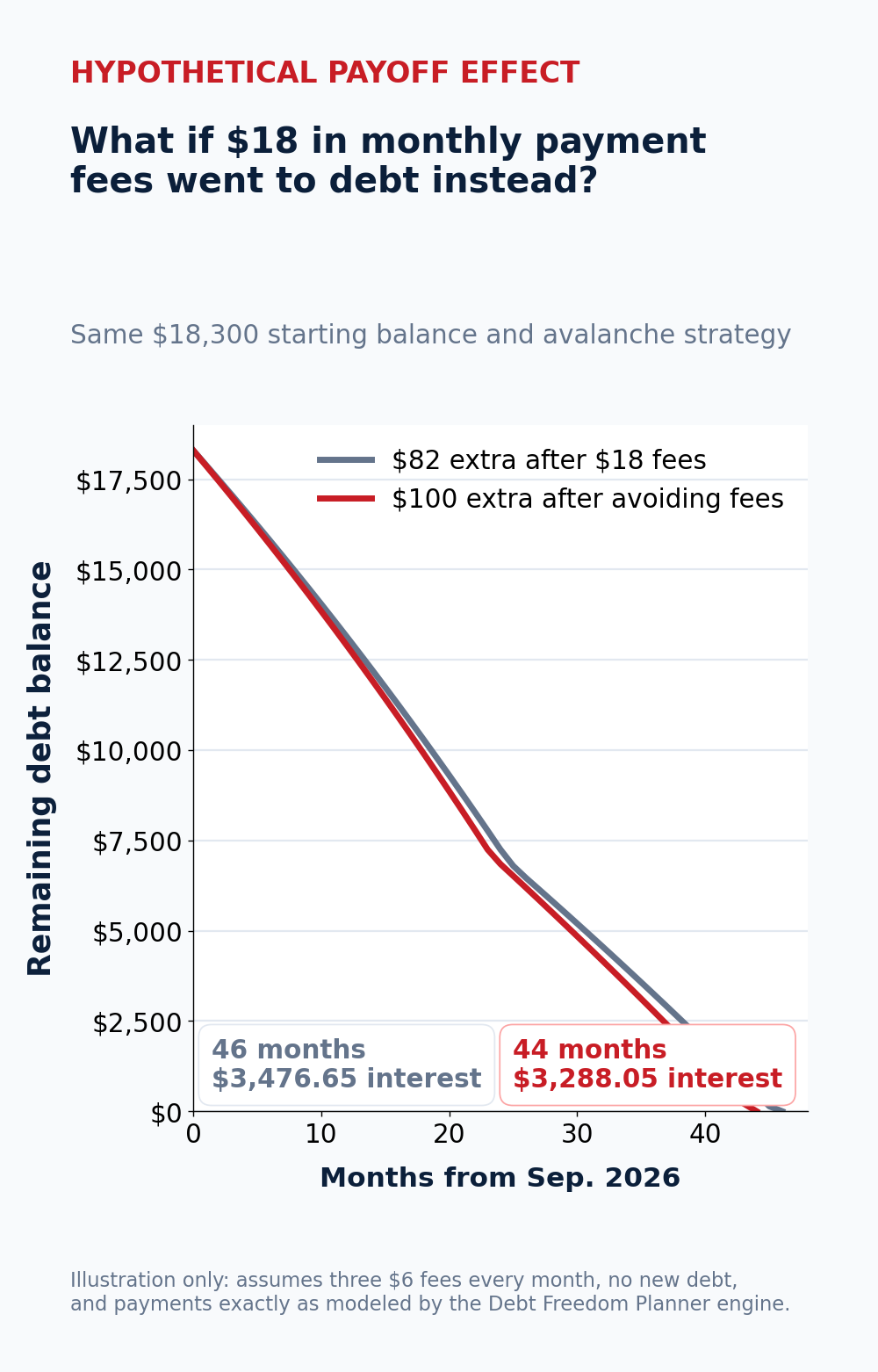
Hypothetical Debt Freedom Planner engine result: three assumed $6 monthly fees reduce the extra payment from $100 to $82. The model holds balances, APRs, minimums, strategy, and start date constant.
Put the verified amount into your payoff plan
After you confirm the payment channel and its true cost, use the amount that actually reaches debt in your plan. If avoiding a recurring fee frees $5, $10, or $18 each month, add that amount to the extra-payment field instead of treating it as invisible spending.
Try Debt Freedom Planner to enter your balances, APRs, and minimum payments, compare snowball and avalanche ordering, and see how a verified extra payment changes the projected payoff date and interest. The tool does not connect to your bank or submit payments; it models the payoff path from the numbers you provide.
Bottom line
The moment before you click “pay” is part of debt strategy. Begin with the statement, verify the exact destination, read the total and recurring terms, understand when the creditor will receive the money, keep the receipt, and confirm the credit. That protects the due date and keeps avoidable fees from quietly taking money away from your next target debt.
This article provides general educational information, not individualized financial, legal, tax, credit-repair, or cybersecurity advice. Payment rights and remedies can depend on the account agreement, payment method, timing, and applicable law.
0 comments
Ask a question, add context, or share what worked for your household.
Create a free account or sign in to comment, reply, and vote on blog posts.